What source can reveal about security
Public HTML can reveal security-relevant clues without exposing private backend logic. A source review can show whether pages load over HTTPS, which external scripts are referenced, whether forms have useful attributes, whether security-related meta tags exist, and whether third-party services are embedded. These observations are useful for triage, but they are not a substitute for a penetration test or a server configuration audit.
Continue exploring: Use the ViewSourcePage source analyzer to inspect a public page, then compare your findings with our guide on View Source vs Inspect Element: What Is the Difference?.
HTTPS and secure delivery
The first check is the page URL itself. A secure HTTPS connection protects transport between the browser and server, while modern security headers can add browser-side protections. Source inspection can confirm that asset references use secure URLs, but headers such as HSTS cannot be fully verified from HTML. Use HTTP header inspection for that layer.
Third-party JavaScript
External scripts are among the most visible security and privacy clues in source. Analytics, advertising, chat, widgets and embedded services can execute code or initiate network requests. Inventory these references and ask whether each dependency is necessary, trustworthy and maintained. A source viewer identifies the reference; network and policy testing reveal what the resource actually does.
Content Security Policy
A Content Security Policy is normally delivered as an HTTP response header, although a meta-based policy can also exist. Because a source viewer focuses on HTML, it may not show the complete CSP configuration. When security is the question, inspect response headers as well and compare the policy with the scripts and styles the site genuinely needs.
Forms and user input
HTML forms can reveal where user input is sent and whether a page uses secure HTTPS actions. Source can also show input names, autocomplete attributes and client-side validation hints. These are useful observations, but client-side validation is not a security control. Server-side validation, authentication, authorization and output encoding remain essential.
Framing and clickjacking
Clickjacking protections are usually delivered through HTTP headers such as Content-Security-Policy frame-ancestors or X-Frame-Options. A source viewer may show iframe markup, but it cannot prove response headers are correct. Use source as a clue and header inspection as the verification step.
Mixed content and insecure references
A secure page that references HTTP resources can create mixed-content problems. Search source for http:// references and inspect image, script, stylesheet and iframe URLs. Not every HTTP string is an active resource, so validate suspicious references before concluding there is a vulnerability. Relative URLs are often preferable because they inherit the page protocol.
Secrets in public source
Anything delivered to the browser should be considered public. API keys intended to remain secret, private tokens, database credentials and server configuration must never be embedded in HTML or client-side JavaScript. A source audit can catch accidental exposure, but prevention belongs in application architecture and deployment processes.
Security headers are a separate layer
Headers such as HSTS, CSP, X-Content-Type-Options, Referrer-Policy and Permissions-Policy are not reliably visible in page source. They travel with the HTTP response. A mature security workflow therefore combines source inspection, response-header inspection, dependency review, TLS checks and authorized application testing.
Safe source inspection
Only inspect public pages you are authorized to access. Do not use a source viewer to bypass authentication, probe private IP ranges, enumerate protected endpoints or stress a third-party service. A responsible public-source tool should block internal destinations and enforce request limits. Users should also respect site terms, rate limits and applicable law.
A practical security checklist
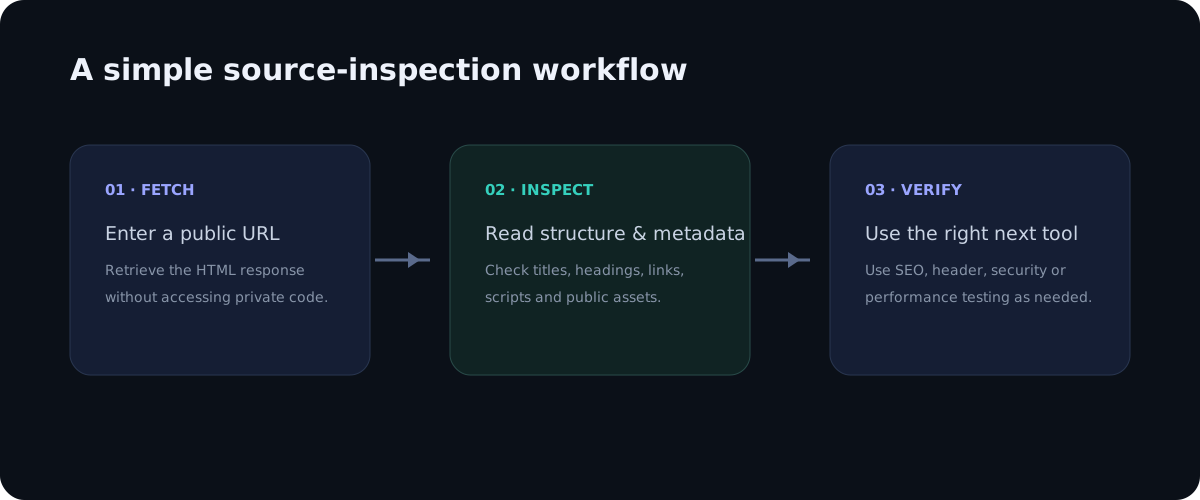
Start with HTTPS and secure resource references. Inventory external scripts and frames. Look for obvious secrets or sensitive values that should never be client-visible. Then inspect HTTP security headers, TLS configuration, cookie attributes, authentication and server-side authorization with dedicated tools. This layered approach is more reliable than treating HTML source as a complete security audit.
Conclusion
Source inspection is valuable for security because it exposes the public boundary of a website. It can show dependencies, forms, resource references and accidental client-visible data. The strongest workflow treats these findings as clues and then verifies them with network, header, application and infrastructure testing. Used responsibly, source inspection is a fast way to identify questions worth investigating without pretending that public HTML contains the private server implementation.
Frequently asked questions
Can page source reveal PHP?
No. Server-side code is executed before the browser receives the response.
Can source reveal an API secret?
If a secret is accidentally embedded in client-visible HTML or JavaScript, it can be exposed. Real secrets should remain server-side.
Is source inspection a penetration test?
No. It is a public-document review and should be combined with authorized security testing when deeper assurance is required.
How to turn source clues into a responsible review
A useful security review starts by defining what you are trying to learn. If the question is whether a page loads third-party code, inspect script and iframe references. If the question is whether a page contains an accidental secret, search client-visible markup and JavaScript bundles for values that should never be exposed. If the question is whether the site is protected against browser-based attacks, move from source to response headers and browser security behavior. Each question needs the right evidence.
It is also helpful to separate passive observation from active testing. Reading public HTML is a passive activity. Sending unusual requests, testing authentication boundaries, attempting to bypass access controls or probing infrastructure can become active security testing and should only be performed with explicit authorization. A source viewer should keep the passive use case simple and safe.
Modern websites often depend on many external services, so an inventory can be surprisingly valuable. Group third-party references into analytics, advertising, customer support, media, fonts, payments and other categories. Then ask whether the business still needs each dependency. Removing unnecessary integrations can reduce both attack surface and performance overhead.
Another important habit is to avoid publishing sensitive findings unnecessarily. If a public page accidentally exposes a token or private identifier, do not reproduce the secret in a public article or screenshot. Report it through an appropriate responsible-disclosure channel and recommend rotation or revocation. The goal of source inspection is to improve security, not amplify an exposure.
Security is broader than source code
HTML is only one layer of a web application. A secure deployment also depends on server configuration, dependency updates, authentication, authorization, database permissions, TLS, backups, logging and monitoring. Source inspection can tell you what reaches the browser, but it cannot prove that the server is correctly configured. Treat it as one useful window into a much larger system.
For teams, documenting security assumptions is as important as finding individual issues. Write down which resources are public, which systems require authentication, which third-party scripts are approved and which headers are expected in production. A short checklist can then be run after deployments. This reduces the chance that a secure configuration quietly changes during a redesign.
Finally, remember that source inspection should be proportionate. A small informational site may need a lightweight review, while a payment application needs formal threat modeling, dependency scanning, penetration testing and continuous monitoring. Public HTML is useful in both cases, but its role is different. Use it to understand the browser-facing surface, then choose deeper controls based on the sensitivity and complexity of the application.
What source inspection can reveal
Public markup can expose useful security clues because a browser must receive some information to render a page. Look for references to third-party scripts, exposed configuration-like values, form actions, iframe sources, security-related meta elements and links to external resources. These observations are starting points for investigation, not proof that a vulnerability exists.
It is also worth checking whether sensitive-looking values are actually secrets. A public API identifier, analytics measurement ID or client-side application identifier may be designed to be visible. By contrast, passwords, private keys, database credentials and authentication tokens should never be embedded in ordinary public HTML. If a real secret is discovered, it should be handled as a security incident rather than tested or abused.
Security headers need a separate check
HTML source cannot show every browser security control. Headers such as Content-Security-Policy, Strict-Transport-Security, Permissions-Policy and X-Content-Type-Options are delivered at the HTTP layer. A source viewer can help you find scripts and resources that a policy would govern, but you need an HTTP header check to confirm the actual response headers. This distinction prevents a common mistake: assuming that clean HTML automatically means a secure response.
Forms and external destinations
Forms deserve careful attention during a source review. Check the form action, method, visible fields and references to external submission endpoints. A form posting to another domain is not automatically unsafe, but it deserves context. Developers can use legitimate payment, authentication or customer-service providers, while attackers can also inject unexpected destinations. Compare the markup with the intended user journey and investigate anything that does not fit.
Third-party scripts and supply-chain risk
External JavaScript is another useful area to inventory. A page may load analytics, advertising, chat, A/B testing, consent management or customer-support tools. Every external script adds a dependency and can potentially execute in the page context. Source inspection can tell you what is referenced, while network and browser security tools are needed to evaluate when it loads, what it requests and whether the site has appropriate controls around it.